How do you set up a Garmin vivoactive 4 watch for running?
Running with your Garmin vivoactive 4 watch comes down to four settings: three data screens matched to the session, your own heart rate zones instead of the defaults, a pace or heart rate alert that suits the conditions, and a GPS mode that suits the run. Every step below was checked against the watch's owner's manual.
Key takeaways
- Set up three data screens: pace with distance and time, heart rate with cadence, and lap pace for intervals.
- Set your heart rate zones yourself from a field test. The default zones work from your profile, not your body.
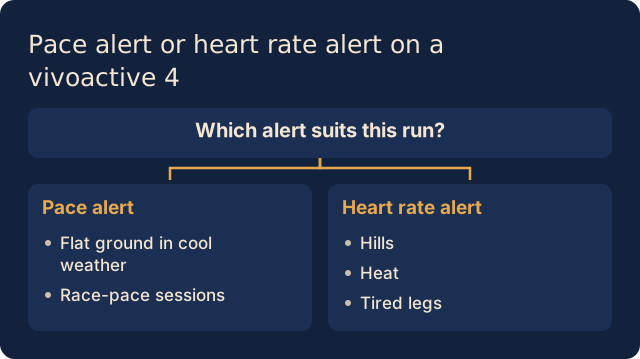
- Use a pace alert on flat, cool routes and a heart rate alert on hills, in heat or when tired.
- Wrist heart rate lags on short intervals. A chest strap measures better, and the watch picks up that data on its own.
- Battery is rarely the problem: Garmin rates this watch at up to 18 hours of GPS without music and up to 6 hours with music.
Which data screens should you turn on?
Three screens are enough. More screens means more looking at your wrist and less running by feel. You change them on the watch: hold the button, choose Activities & Apps, choose Run, open the activity settings and choose Data Screens. Layout sets how many fields a screen shows.
Screen 1: pace, distance, elapsed time
Your default screen for easy and long runs. Choose current pace, not average pace: an average only means something after the first few kilometres.
Screen 2: heart rate and cadence
For sessions run by intensity, heart rate is your main field, with cadence below it. A cadence around 170 to 180 is a useful reference for many runners, but the right value varies by person and pace. More in whether cadence actually matters.
Screen 3: lap pace and lap time
Use Lap Pace and Lap Time for intervals, so you see what each rep delivered instead of an average across the session. A long run mostly needs distance. Choose your screens by session type, and accept that on an easy day you may prefer to see nothing at all.
How do you set correct heart rate zones?
The watch's default zones come from your user profile and are percentages of your maximum heart rate. If that maximum is wrong, every zone is wrong. Formulas like 220 minus age are group averages: research by Tanaka showed that formula tracks reality poorly, and two runners of the same age can sit far apart. That's how an easy run quietly becomes a tempo block.
Finding your threshold heart rate with a field test
After a thorough warm-up, run 30 minutes as hard as you can hold evenly. Your average heart rate over the last 20 minutes is a good estimate of your threshold heart rate. The watch has no threshold feature of its own, so you do this test by hand. Pick a day with fresh legs and good sleep.
Entering your zones
On the watch, hold the button and choose User Profile, Heart Rate Zones, Running, Preference and Set Custom. Enter your maximum heart rate and then the limit of each zone; you can also do this in your Garmin Connect account and sync the watch. A common choice is your threshold as the top of zone 4. Running and cycling have separate zones, so you only change your running zones.
Pace alert or heart rate alert: which do you use when?
Alerts sit in the activity settings under Alerts. Pace and heart rate are both range alerts: you set a lower and upper limit and the watch warns you when you leave that range.
When pace works
On flat ground in cool weather, pace steers a run well. The same goes for race-pace sessions, since race day is run on pace too.
When heart rate works better
On hills, in heat or on tired legs, pace says little: the same speed costs more. Set a heart rate alert on your easy zone instead. If a long run feels harder this week than last, read why easy pace feels harder some weeks.
How accurate are GPS and wrist heart rate?
For most easy runs both are good enough, as long as you know the limits.
GPS: distance and pace
Per activity you choose GPS Only, GPS + GLONASS or GPS + GALILEO. The combinations help with a poor view of the sky but use more battery. Between tall buildings and under trees your pace wobbles noticeably over short stretches. For exact pace per rep, run on a track or pair a foot pod. Wait for the watch to find satellites before you start.
Wrist heart rate: intervals and spikes
Optical measurement is usable on easy runs, but wrist monitors are less accurate than a chest strap, especially when effort changes. On short reps you often see heart rate still climbing while you're already recovering. If you train on heart rate, pair a chest strap: the watch uses that data automatically when both are available. A strap still only measures your heart rate; heat and fatigue affect what it means.
How do you use workouts on the vivoactive 4?
Build your session in the Garmin Connect app and send the data to your watch. Each step gets a target, and repeats form their own block. For an easy run, one long step with a heart rate target in zone 2 is enough. Use a name you'll recognise.
To start: press the start button, choose Run, swipe up, choose Workouts, pick your session and then Do Workout. Start the timer; the watch shows each step with its target and current data. For why that easy run belongs there, see why you run easy even when you feel great.
Which features are noise and which actually help?
The vivoactive 4 measures around the clock, but not every number deserves your attention. Body Battery and stress are derived scores: read them as context, never as a reason to drop a long run. The reasoning is in what a readiness score actually measures.
The VO2Max estimate is useful over time. The watch updates it after an outdoor run of at least 15 minutes, so look at the direction over weeks, never a single reading. More in whether you can trust your watch's VO2Max. This watch shows no recovery time after a session: judge the next one from your own resting heart rate and legs, see recovery after running.
What do you turn off to save battery on long runs?
Garmin rates the vivoactive 4 watch at up to 18 hours of GPS without music and up to 6 hours with music. A 2.5 hour long run fits easily, unless you start half empty. Music is by far the biggest drain: leave it behind when you're out for a really long time.
Three settings help too. Choose GPS Only rather than a combination with GLONASS or GALILEO. Under System and Backlight, turn off the gesture or shorten the timeout. Limit phone notifications, or turn Bluetooth off if you use no connected features on the run. Sync your watch after you finish.
Where does the vivoactive 4 stop?
The watch measures pace, heart rate, distance and cadence well enough to review your week, but the meaning stays with you. You can see you were slower on Thursday, not whether that was recovery, fatigue or too hard a Tuesday. Tempo reads the data your watch syncs to Garmin Connect and lays your runs and time in zone side by side. You ask in plain language and get an answer with the reasoning. You decide.
Sources
- Age-predicted maximal heart rate revisited. Tanaka et al., 2001, J Am Coll Cardiol.
- Variable Accuracy of Wearable Heart Rate Monitors during Aerobic Exercise. Gillinov et al., 2017, Med Sci Sports Exerc.
- Heart rate monitoring: applications and limitations. Achten and Jeukendrup, 2003, Sports Med.
More questions about your vivoactive 4?
- Can my vivoactive 4 watch sync to Strava?
- Yes. Link your account in Garmin Connect to Strava; your watch then syncs finished runs across automatically. Strava applies its own heart rate zones to that data, so set those there separately if you want them to match.
- How do I set a cadence alert?
- In the activity settings open Alerts, choose Add New and then Cadence. You set a lower and upper limit. Use your own numbers from easy runs, because the right cadence varies by person and by pace.
- Why is my heart rate wrong during intervals?
- The optical sensor on your wrist reacts more slowly than a chest strap. On short reps you only see heart rate rise once you are already recovering. Spikes from cold or a loose band happen too. Wear the watch snug or use a chest strap.
- Does Tempo work with a Garmin vivoactive 4 watch?
- Yes. Tempo reads the runs your watch syncs to Garmin Connect, from the moment you connect. Older runs do not come across. Tempo cannot connect to Apple Health yet. Which session you run stays your call.
- How often should I reset my heart rate zones?
- Repeat the field test a few times a year, for example at the start of a new training block. Do it sooner if your heart rate clearly shifts on familiar sessions. Test on a day with fresh legs, because fatigue skews the result.
Tempo puts your watch's data next to your training
Your runs, your zones and your pace come together in one conversation, so you decide what your next session is.
Start your free trial14 days free, no credit card.